
Interactive Focus
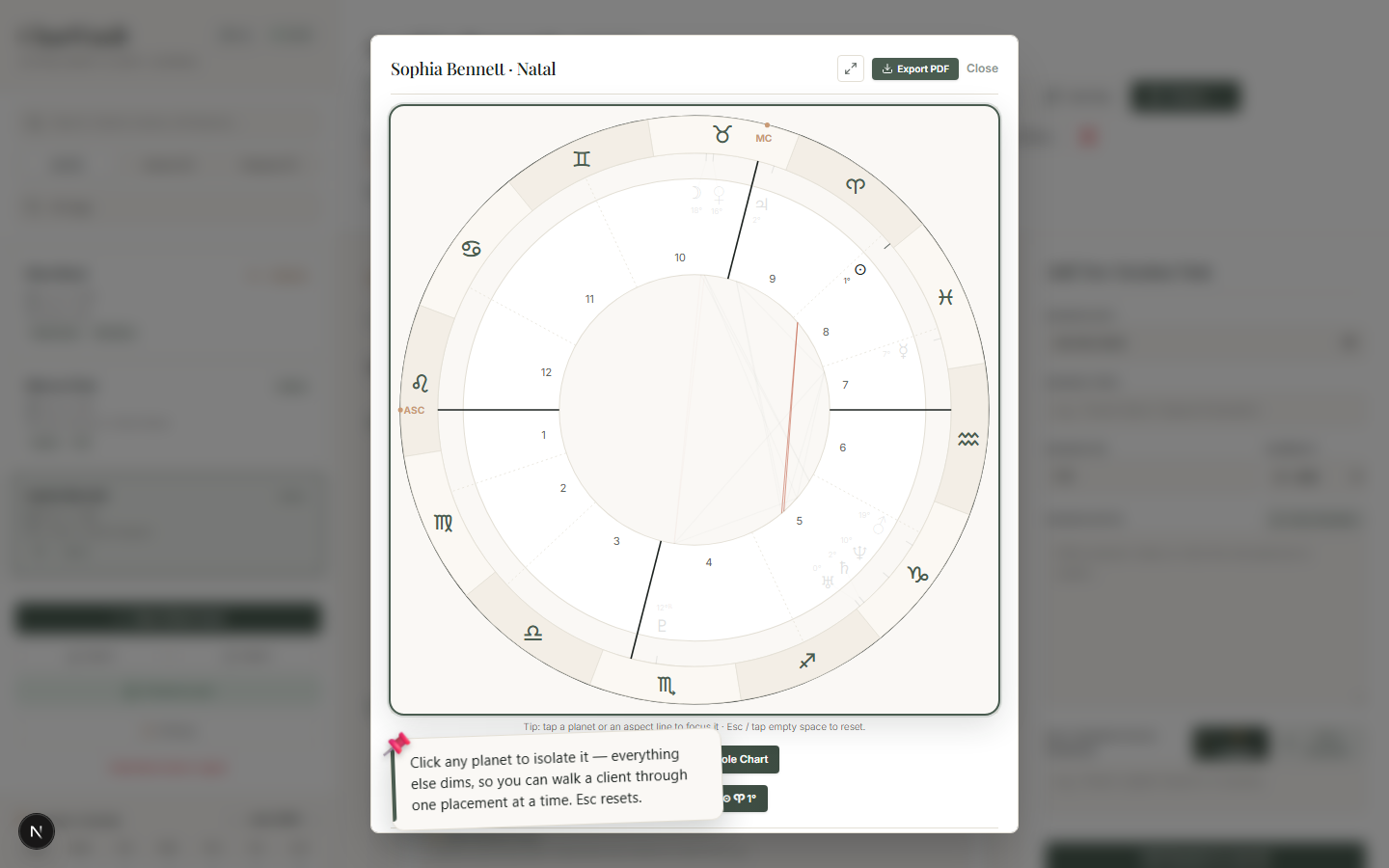
Click any planet or aspect to isolate it — everything else dims so you can study one placement at a time.
A full chart is a lot to take in at once. Interactive Focus lets you — or your client — concentrate on a single placement or a single aspect, with everything else dimmed.
Focus a placement
- With a chart open, click a planet on the wheel.
- ChartVault highlights that planet and dims the rest of the chart.
- Press Esc, or click empty space, to reset.
While a planet is focused, you can tap ✨ Interpret to get an AI reading of that exact placement — its sign, house, dignity and retrograde state.
Focus a single aspect
Click a single aspect line through the centre and ChartVault isolates just that aspect — the two bodies and the line between them — so a tight, important aspect can be examined on its own. Esc resets.
Focus a detected pattern
In the Chart Patterns panel, tap a detected figure (a T-Square, Grand Trine, Yod…) and the wheel lights up only that figure's planets and aspect lines. It's the fastest way to see a complex configuration's geometry at a glance.
Built in, fully offline
Isolating placements and aspects is the kind of feature the expensive cloud suites put behind a subscription. In ChartVault it's built in and works with no internet.